

If you’ve ever made a solid YouTube video and then… stopped there, you’re not alone. Creating the video is already a big lift. Turning it into a blog post feels like a second job.
But here’s the truth: leaving your content only on YouTube is like building a great asset and using it in just one place. A blog post gives that same video a second life; Google traffic, internal links, evergreen search visibility, and more reach.
That’s why we built a YouTube to Blog Post Generator: a fast tool that converts a video’s transcript into a structured, SEO-friendly blog draft you can actually edit and publish.
👉 Try the tool here:
https://randomprompts.org/tools/youtube-blog-post-generator
What the YouTube to Blog Post Generator actually does
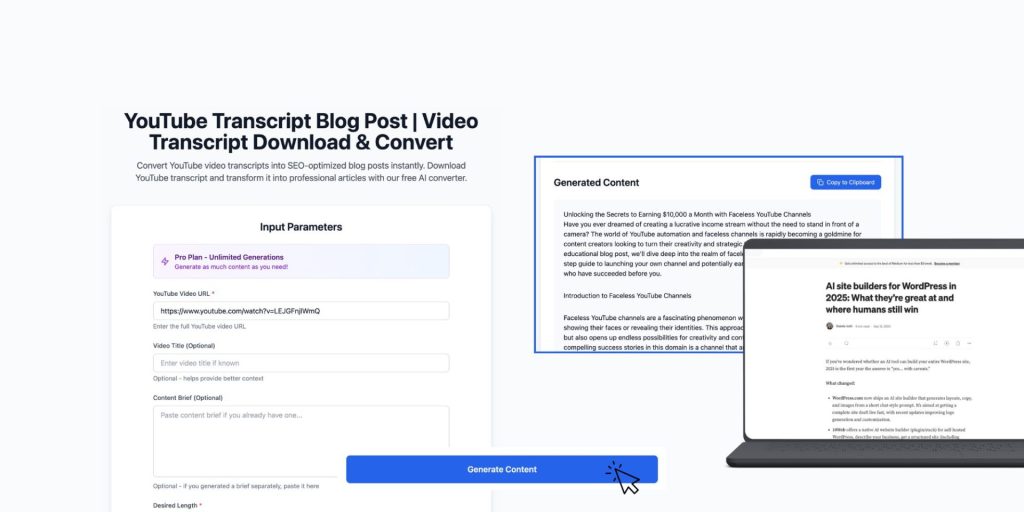
This tool is designed to save time, not replace your voice.
It helps you generate a blog draft based on a YouTube video, including:
-
A clean blog structure (H1/H2/H3 sections)
-
A readable article draft based on the video’s content
-
SEO-friendly headings and flow (so it doesn’t feel like a transcript dump)
-
Optional: CTA placement, formatting, and content organization
Important: This is not meant to produce a perfect, “publish without editing” article. It’s meant to give you a real starting point so you’re not staring at a blank page.
Why turning YouTube videos into blog posts works

A blog post helps you:
-
Rank on Google for keywords your video might never rank for
-
Capture search intent (people who are researching, not just scrolling)
-
Build topical authority by linking related posts together
-
Reuse the same idea across your ecosystem: blog → email → LinkedIn → tweet thread
In short: one video becomes an engine.
How it works (simple workflow)
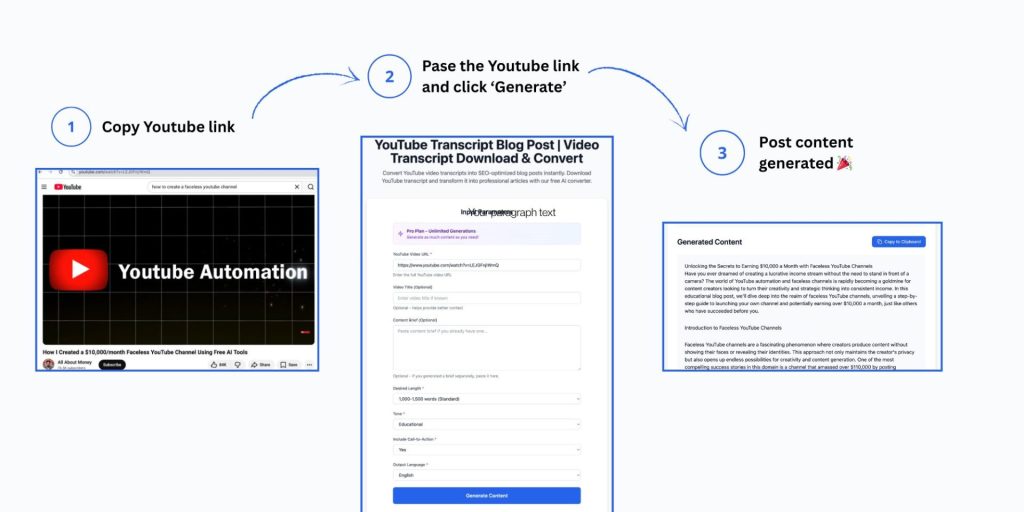
1) Paste your YouTube link
Add the URL of your video.
2) Choose how you want the blog post to sound
Pick tone (e.g. friendly, professional, educational) and select the approximate length or style you want.
3) Generate your draft
The tool produces a structured draft with headings and paragraphs that you can refine.
4) Edit it (this part matters)
Use the draft to:
-
tighten sections
-
add your personal examples
-
fact-check
-
improve clarity
-
insert internal links
You get speed without losing quality.
What makes a “good” AI-generated blog draft?
A usable draft usually has:
-
clear sections
-
logical order
-
scannable headings
-
a human tone (not overly formal, not robotic)
-
space for your own additions
The goal is not “AI wrote it.”
The goal is: you publish faster.
Best use cases
This YouTube to Blog Post Generator is useful if you’re:
-
a creator who wants to repurpose content weekly
-
a founder building SEO visibility
-
a blogger writing around video content
-
a marketing team turning webinars into articles
-
an agency creating content for clients
Tips to get better results from the tool
✅ Use one clear topic per video
Videos that jump between topics create messier drafts.
✅ Add a simple target keyword (even if rough)
If your blog post is about “cold email examples,” that phrase should appear naturally in headings and intro.
✅ Edit the intro + conclusion first
Those sections influence the entire “feel” of the post.
✅ Add internal links
At minimum, link to:
-
your core related tools
-
your best topical posts
-
a relevant category page
